
IMPORTANT
This Smart Content item is for Education Subscriptions only.
House points can be a way to promote positive behaviour, encourage pupils to support each other and bring a little competition. Our House Points Smart Content allows you to easily keep track and showcase house points to your community. Follow the steps below to get started:
- In the top right corner of your Feed, click Add and select Smart Content.
- Click on House points.

- In the top right corner, click Add to feed.
- Input House name
- Choose House colour
- Upload a House image
- Input number of points
- Click Add House
- Repeat step 3 for as many houses as your school uses.
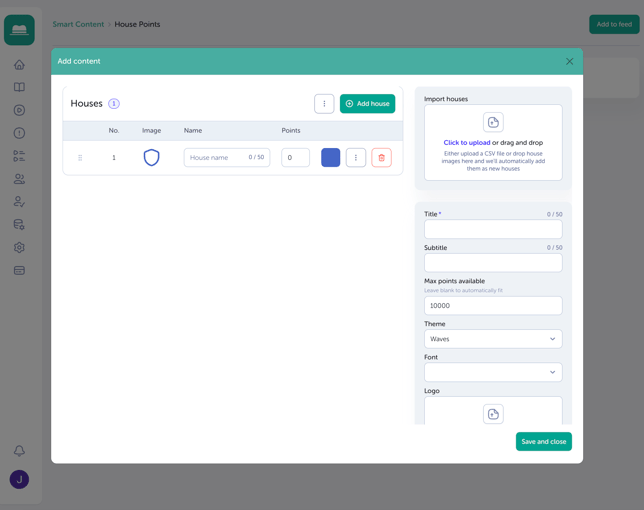
- Next, add a title for your House Points slide, i.e. School House Points.
- Optional: add a subtitle, i.e. Awards given on December 10th.
- Optional: choose a theme.
- Optional: add your logo.
- Click Save once you're happy with your changes.
NOTE
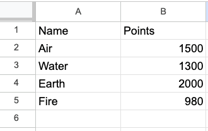
As an alternative to adding Houses manually, you can add them using a CSV file. Follow the format in the image below, and then you can add the file into Import Houses.
TIP
When adding House Points, you can set a Max points available value. To ensure the graph scales correctly, add a value slightly above the leading value, or leave the field blank and the graph will auto-adjust as points are updated.